
Quantzee AI Adaptive Quant Toolkit
Adaptive signals, overlays & market intelligence powered by Quantzee.
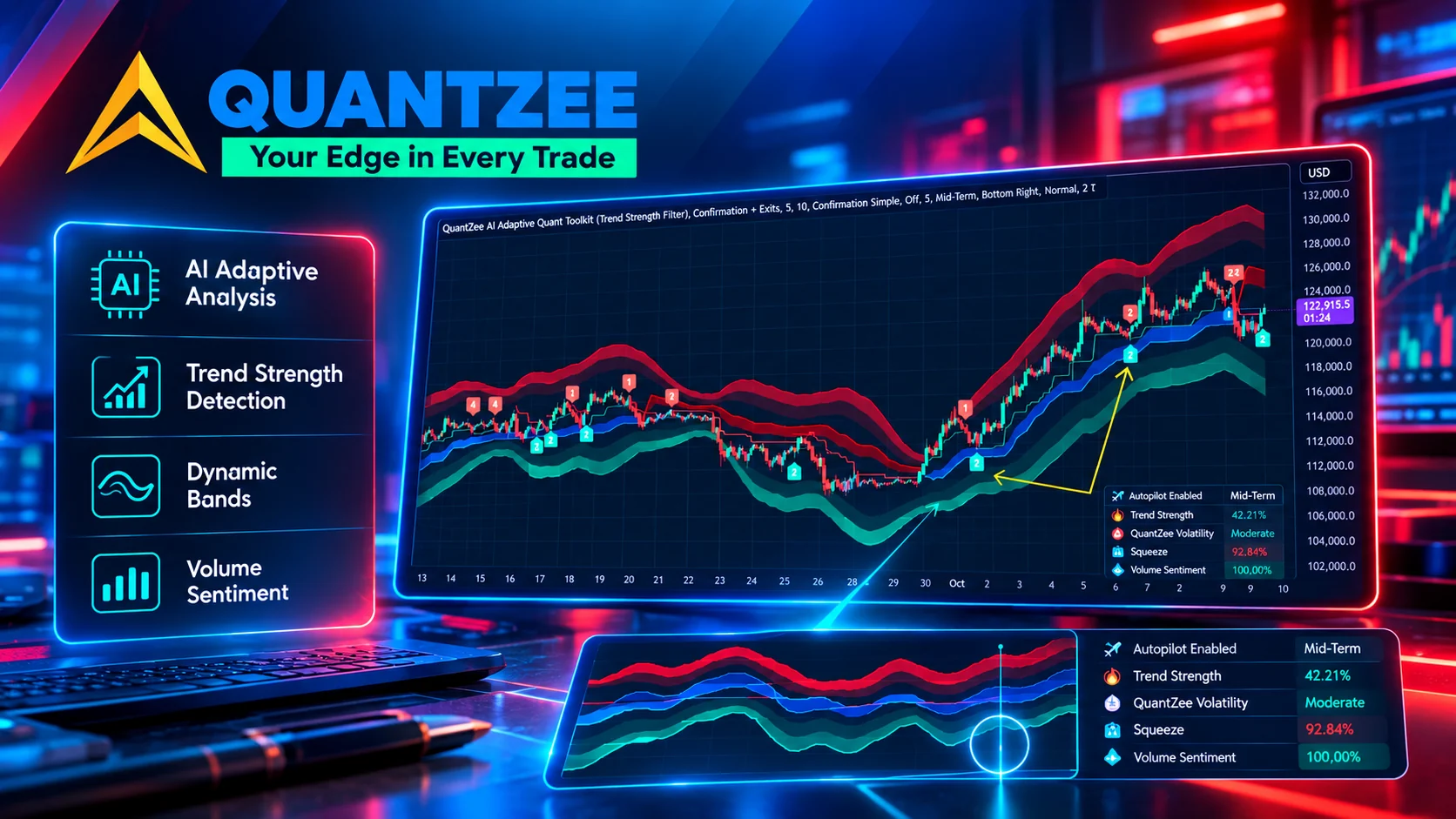
A next-generation trading framework that fuses adaptive signal generation, contextual overlays, and a live analytics dashboard into one clean, actionable system. Developed using proprietary Quantzee Adaptive Intelligence, this toolkit merges algorithmic signal generation, machine-driven optimization, and multi-layered visual analytics into a single AI-assisted decision-support system.
Unlike conventional indicators that rely on fixed formulas, the Quant Toolkit dynamically tunes itself to evolving volatility and trend structure — a truly adaptive environment suitable for all market conditions. Whether you are a scalper, swing trader, or trend follower, this single framework integrates multiple modules to generate high-probability buy/sell signals, identify trend reversals, and visualize market structure overlays in real time.
Want the full walkthrough? Read the full setup guide and settings reference in the docs.
Works on TradingView · All markets & timeframes
Purpose & Design Philosophy
Four Intelligent Layers, One Decision System
Quantzee's mission is to bridge human intuition with algorithmic precision. The result is a modular AI ecosystem that adapts automatically — allowing traders to simplify their chart, reduce noise, and act with clarity.
Signal Layer
Turns trend changes into BUY and SELL signals. Choose the Classic engine (the default) or the Adaptive engine.
Overlay Layer
Shows trend, trailing-stop and stretch context on the chart with Quantzee's Quant Trail, Pulse Line, Quant Cloud and Stretch Zones.
Intelligence Layer
The AI Signal Score grades every signal from 1 to 4, based on how cleanly the engine's chosen ATR band has been capturing moves.
Dashboard Layer
Shows trend strength, volatility, volume sentiment and market compression ("squeeze"), plus whether Auto-Tune is on.
Core Capabilities
A Toolkit That Self-Optimizes Per Market Phase
Two Signal Engines
Pick one in the Engine dropdown. Classic (the default) gives the same signals as earlier versions of the toolkit: it runs a row of ATR bands side by side, scores each one, groups the scores with 1-D k-means clustering and follows the best group. Adaptive runs nine ATR bands and blends them, leaning toward the bands with the best recent edge. Signal Profiles, alerts and the dashboard work with both.
AI Signal Score
Every BUY or SELL label shows a score from 1 to 4. A higher score means the engine's chosen band has been moving with price more cleanly in recent bars. Turn the score off and the label shows an arrow instead, with a "+" when the EMA 50 and EMA 200 agree with the signal.
Candle Coloring
MACD-based candle colouring maps trend momentum on each bar. Choose Trend Solid, Trend Gradient, Counter-Trend Gradient or None. Counter-Trend Gradient swaps the bull and bear colours for mean-reversion reads.
Signal Profile
One dropdown with five profiles: None, Swing Mode, Counter-Trend Mode, Strength Gate and Pulse Gate (the default). Swing Mode and Counter-Trend Mode change several settings at once; Strength Gate and Pulse Gate hide signals that go against their condition.
Confirmed Bars Only
Off by default, so signals can appear on the live bar. Turn it on and signal labels, exit marks and every alert wait for the bar to close, so nothing appears and then vanishes mid-bar. Turn it on before you set up close-only alerts.
20 TradingView Alerts
BUY and SELL entries, long and short exits for Trigger Wave, Oscillator Cross, Quant Trail, Quant Cloud and Trailing Stop, combined "Any Signal" exits, five Ribbon alerts with JSON messages for webhooks, and one Any Signal alert.
Walkthrough
The AI Quant Toolkit On A Live Chart
Core Signal Engine
How the Engine Generates a Signal
Optional gate profiles block signals using Pulse Line direction or a trend-strength threshold — allowing a cleaner and more confident read of price action.
01
Set the Range
Signal Sensitivity sets the range of ATR factors to test. Auto-Tune can set the range for you.
02
Test the Bands
The engine runs ATR bands across that range and scores how well each one has been capturing moves.
03
Pick or Blend
Classic groups the scores with k-means and follows the top group. Adaptive blends nine bands toward the best scores.
04
Signal + Score
A master ATR band at the chosen factor flips trend and prints a BUY or SELL with its 1–4 AI Signal Score.
05
Gate + Confirm
The selected gate profile can block the signal, and Confirmed Bars Only can hold it until the bar closes.
Advanced Overlays & Tools
Six Adaptive Visual Layers
Quant Trail
An ATR trailing stop with a shaded band. It only moves with the trend and flips when price closes through it. Fast style (default) or Slow style, with its own settings group. On by default.
Pulse Line
A smoothed moving average (EMA, SMA, WMA or RMA) that changes colour only after it rises or falls for a set number of bars and price clears it by an ATR buffer. It also drives the default Pulse Gate profile.
Quant Cloud
A two-speed trend cloud built from fast, medium and slow EMAs. It shows trend direction and has its own exit alerts. It is a visual and exit tool, not a signal gate.
Stretch Zones
Mean-reversion bands set by how far price usually strays from its 100-bar average. They shade the stretched areas above and below price — useful for contrarian setups and exit planning. On by default.
AI Moving Average
A moving average whose speed follows the signal engine: it tracks price faster when the engine is capturing moves cleanly, and slower when it is not.
Candle Intelligence
MACD-driven candle colouring in Trend Solid, Trend Gradient or Counter-Trend Gradient mode.
Quantzee Dashboard
A Quant-Style View of Market Health
A compact analytics panel updates live, offering instant clarity on what's driving price action.
- Trend Strength
- Quantzee Volatility
- Squeeze (Compression) Metric
- Volume Sentiment ("n/a" on symbols without volume)
- Auto-Tune Status
Signal Profile Modes
Reshape the Toolkit in One Click
The Signal Profile dropdown has five options: None, two modes and two gates (Pulse Gate is the default). The two modes are below; the gates are in the next section.
Positional trades
Swing Mode
Sets Signal Sensitivity to 18 for fewer, longer-term signals, turns on Quant Cloud and uses Trend Solid candles.
Ranges / fades
Counter-Trend Mode
Turns on Quant Trail and Stretch Zones and switches to Counter-Trend Gradient candles.
Signal Gates
Balance signal frequency vs. accuracy
Pick a gate in the Signal Profile dropdown. A gate hides any signal that does not meet its condition.
-
Pulse Gate (default)
BUY signals show only while the Pulse Line points up; SELL signals only while it points down.
-
Strength Gate
Signals show only when the dashboard Trend Strength reading is 25 or higher.
-
None
No gate — every engine signal is shown.
Auto-Tune
Auto-Tune Sensitivity
Off by default, so Signal Sensitivity stays in your hands. Pick Short-Term, Mid-Term or Long-Term and Auto-Tune replaces the sensitivity range with a set ATR range for that horizon. The dashboard shows which mode is on.
-
Short-Term
Scalping & intradayTight ATR range (factors 1 to 4) for fast reactions to short moves.
-
Mid-Term
Day to swing tradingBalanced ATR range (factors 5 to 10) for the most common chart timeframes.
-
Long-Term
Positional tradingWider ATR range (factors 8 to 13) for smoother signals and less noise.
Usage Strategies
Example Setups
Trend Following
- Keep Signal Mode on Trend + Exits with Trend Solid or Trend Gradient candle colouring.
- Use the default Pulse Gate profile with Quant Trail for confluence.
Counter-Trend Setup
- Pick the Counter-Trend Mode profile: Stretch Zones + Counter-Trend Gradient candles to fade extremes.
- Best for range-bound or mean-reversion markets.
Trend Optimization
- Set Auto-Tune to Long-Term and choose the Strength Gate profile.
- Signals then show only when trend strength is 25 or higher.
Intraday Alerts
- Set Auto-Tune to Short-Term and keep the Pulse Gate profile.
- Turn on Confirmed Bars Only before you create alerts, so they fire only on bar close.
Key Differentiators
Quant Toolkit vs. Generic Indicators
| Feature | AI Adaptive Quant Toolkit | Generic Toolkits |
|---|---|---|
| Self-Tuning Engine | Classic (k-means clustering) or Adaptive (blended ATR bands) | Static formulas |
| AI Signal Score | Score from 1 to 4 on every signal | Basic signals only |
| Adaptive Overlays | Quant Trail, Pulse Line, Quant Cloud, Stretch Zones | Limited or fixed |
| Dynamic Dashboard | Multi-metric live analytics | No built-in analytics |
| Signal Control | Signal Profiles and Confirmed Bars Only | Fixed conditions |
| Alerts | 20 built-in alert conditions | A few, or none |
Why Traders Choose It
Built for the Way a Quant Thinks
Quantzee combines signal scoring, adaptive ATR band selection and layered overlays to understand the market the way a professional quant would — visually, adaptively, and intuitively.
Self-tuning logic (Classic k-means or Adaptive blend engine)
Modular overlays & Signal Profiles
AI Signal Score from 1 to 4 on every signal
Multi-metric live dashboard
Works on all markets & timeframes
20 TradingView alerts, with an optional close-only mode
Trader Reviews
What Traders Are Saying
"The Auto-Tune sweep using K-Means clustering is unlike anything else on TradingView. It evaluates ATR multiplier performance in real time, picks the optimal cluster, and self-tunes without any manual input. Level 4 signals on trending days have been extremely reliable."
Felix H.
"The Quant Cloud identifies momentum zones far better than a standard cloud. Non-repainting signals mean I can trade live without second-guessing the chart history."
Aysha M.
"I use Counter-Trend Mode with Stretch Zones and the MACD-gradient candles to fade overextended moves."
David L.
FAQ
Common Questions
What is the AI Adaptive Quant Toolkit?
It is a TradingView indicator that puts adaptive buy/sell signals, chart overlays, a 1–4 AI Signal Score and a live dashboard into one script. Its signal engine adjusts the ATR band it uses to recent price behaviour instead of relying on one fixed setting.
How is this different from a regular Supertrend indicator?
A standard Supertrend uses one fixed ATR multiplier. The Toolkit tests a range of ATR multipliers on every bar and follows the ones that have been capturing moves best — by k-means clustering in the Classic engine, or by blending nine bands in the Adaptive engine. It then adds a signal score, overlays, Signal Profiles and a dashboard on top.
What is the difference between the Classic and Adaptive engines?
Classic is the default and gives the same signals as earlier versions of the toolkit. Adaptive runs nine ATR bands side by side and blends them, leaning toward the bands with the best recent edge. Signal Profiles, alerts and the dashboard work with both, so you can switch and compare on your own charts.
Do I need to be a quant or developer to use it?
No. The Signal Profile dropdown sets the toolkit up in one click: Swing Mode, Counter-Trend Mode, Strength Gate or Pulse Gate. Advanced users can fine-tune Signal Sensitivity, the engine, Auto-Tune, and the Pulse Line and Quant Trail settings.
Does it work on all markets and timeframes?
Yes — stocks, indices, forex, crypto, and commodities, from 1-minute to weekly charts. On symbols that report no volume, the Volume Sentiment row of the dashboard shows "n/a".
Are the signals non-repainting?
That depends on the Confirmed Bars Only setting. Turn it on and signal labels, exit marks and every alert fire only after the bar has closed, so nothing appears and then vanishes. It is off by default: then a signal can show on the live bar and can disappear if the bar closes differently.
Can I receive alerts?
Yes. The toolkit has 20 TradingView alert conditions: BUY and SELL entries, long and short exits for Trigger Wave, Oscillator Cross, Quant Trail, Quant Cloud and Trailing Stop, combined "Any Signal" exits, five Ribbon alerts with JSON messages for webhooks, and one Any Signal alert. They reach you through TradingView by app, email or webhook. Turn on Confirmed Bars Only if you want alerts to fire on bar close only.
Is AI Adaptive Quant Toolkit actively maintained and updated?
AI Adaptive Quant Toolkit is a paid TradingView indicator that receives ongoing maintenance updates — bug fixes, performance refinements, and improvements based on trader feedback. There is no free tier; the full Pine Script source is emailed to you when you buy Quantzee at quantzee.com/pricing/, in a single one-time purchase.
Related Indicators
More From the Quantzee Suite
Adaptive AI Oscillation Engine
Quant Wave momentum, Flow Pressure, Agreement Gauge, confirmed divergences
AI TrendPulse
adaptive EMA trend detection, AI commentary engine, reversal alerts
SuperTrend Pro+
dual-SuperTrend confluence, auto ATR Entry/TP/SL ladder, MTF dashboard
MACD Pro+
adaptive chop-zone grading, normalized mode, 4-phase histogram, divergence engine
Smart Money Concepts (SMC) Toolkit Pro
BOS/CHoCH structure, order blocks, FVGs, liquidity sweeps, premium/discount zones
Instant Access
Get instant access to the AI Adaptive Quant Toolkit
One payment unlocks all 6 paid Quantzee indicators — full source emailed to you — with real-time alerts and multi-market support.