
Smart Money Concepts (SMC) Toolkit Pro Smart Money Concepts Indicator for TradingView
The Full Smart Money Concepts Picture. One Overlay. Always Current.
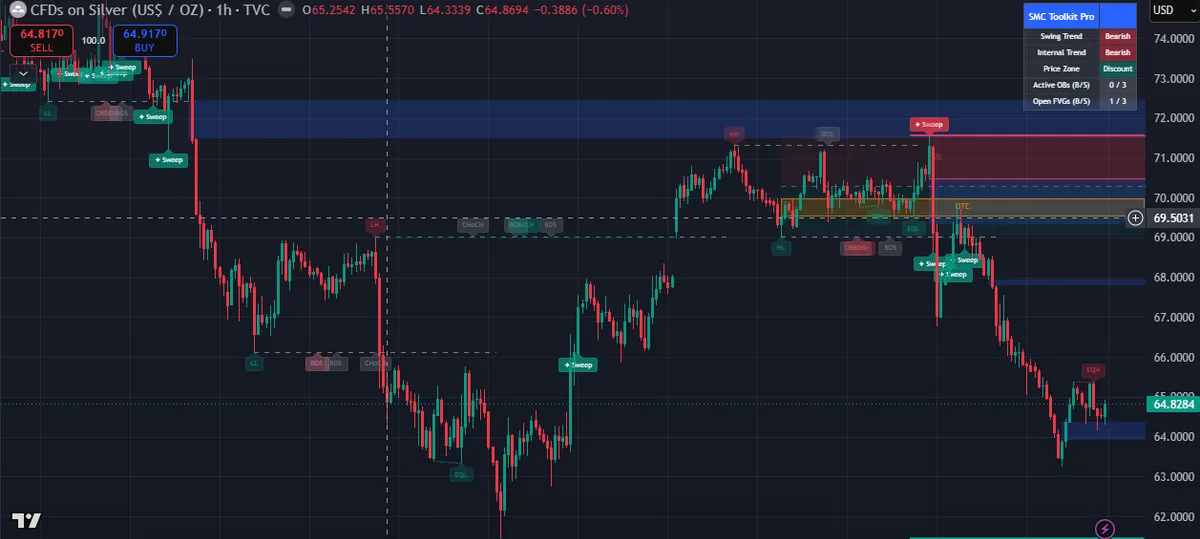
Stop stacking five or six separate SMC scripts on a single chart. Smart Money Concepts (SMC) Toolkit Pro is a complete Smart Money Concepts workbench built as a single TradingView overlay — mapping market structure, order blocks, fair value gaps, liquidity pools, and premium/discount zones simultaneously, updating automatically as price develops.
Whether you trade stocks, forex, crypto, or indices — on any timeframe — it gives you the institutional price-action framework in a clean, consistent read you can act on without manually drawing a single zone.
Want the full walkthrough? Read the full setup guide and settings reference in the docs.
Invite-only · Non-repainting on confirmed bars · Works on all markets and timeframes
The Problem It Solves
Most Traders Use Five Scripts Where One Should Do
Separate structure scripts, zone scripts, gap scripts, and liquidity scripts clutter your chart and give you inconsistent readings. SMC Toolkit Pro replaces them all.
Script Clutter
Stacking five or six SMC scripts creates visual noise, slows your chart, and leads to conflicting zone readings.
Manual Zones
Hand-drawing order blocks and FVGs every session is time-consuming and inconsistent — you miss zones the moment you blink.
Stale Zones
Scripts that don't auto-remove mitigated blocks leave a graveyard of dead zones cluttering your chart.
Missing Context
Trading only the current timeframe without higher-timeframe reference leads to fighting the dominant institutional bias.
No Alerts
Without automated alerts on SMC events, you can't step away from the screen without missing structure shifts, sweeps, or new gaps.
How It Works
A Complete Institutional Price-Action Framework in One Overlay
01
Dual-Layer Market Structure
Tracks two independent structure legs simultaneously — a fast internal leg for early shifts and a slower swing leg for the major picture. Each meaningful break is labelled BOS (trend continuation) or CHoCH (first sign of a potential reversal).
02
Automated Institutional Zones
Order blocks, fair value gaps, and liquidity pools are identified and drawn automatically from confirmed price action — not estimated or hand-drawn — and cleared from the chart the moment price mitigates or fills them. This real-time mitigation removal is what separates the toolkit from static zone indicators: at any moment you see only the active, unmitigated supply and demand zones that remain relevant to current price structure.
03
Range Intelligence
Frames the current dealing range into premium and discount halves around equilibrium, highlights the Optimal Trade Entry (OTE) retracement band, and projects key higher-timeframe swing levels so you always know the bigger-picture reference without flipping timeframes.
04
Live Dashboard + 14 Alerts
A compact on-chart table shows swing trend, internal trend, premium/discount state, and active zone counts at a glance. Every meaningful event — from structure breaks to liquidity sweeps — has its own TradingView alert condition.
Combined, the modules let you:
- Map structure breaks in real time across two independent legs
- Surface unmitigated order blocks and unfilled fair value gaps only — no dead-zone clutter
- Flag equal highs/lows and liquidity sweeps the moment they occur
- Confirm whether price is trading at a premium or a discount relative to the current range
- Project higher-timeframe reference levels without switching charts
- Alert you on every meaningful SMC event so you never miss a setup
Features
The Complete SMC Toolkit — Everything on One Chart
Eight independent modules. Every one runs automatically and stays current as price develops.
Market Structure — BOS & CHoCH
Two independent structure legs run simultaneously: a fast internal leg catches early character shifts; a slower swing leg tracks the dominant trend. Every break is classified as BOS (continuation) or CHoCH (potential reversal) so you see the early internal shift before the major structure confirms.
Order Blocks + Auto-Mitigation
Bullish and bearish institutional supply/demand zones are identified at each structure break and plotted automatically. Mitigated blocks — those price has returned to and reacted from — are removed so only active, unmitigated zones remain on screen.
Fair Value Gaps (Imbalances)
Price imbalances that institutions tend to revisit are detected and drawn as zones. Each gap is cleared automatically once filled, leaving only unfilled gaps that still represent potential price magnets.
Liquidity Mapping & Sweeps
Equal highs and equal lows — the resting buy-side and sell-side liquidity pools — are highlighted automatically. Liquidity sweeps (stop runs where price spikes through a prior extreme then fails back inside) are flagged as they occur — some of the highest-conviction SMC events.
Premium / Discount + OTE
The current dealing range is divided into premium (expensive) and discount (cheap) halves around an equilibrium midpoint. The Optimal Trade Entry retracement band is highlighted within it, so you can bias longs from discount and shorts from premium rather than chasing extended price.
Higher-Timeframe Context
Key higher-timeframe swing levels are projected directly onto your trading chart. Setups that align with HTF structure carry more institutional weight than those fighting it — and you see both on the same view without switching timeframes.
Swing Point Labels
Major swing pivots are labelled as higher highs, higher lows, lower highs, and lower lows — giving an instant read of the underlying trend skeleton without interpretation.
Live On-Chart Dashboard
A compact table on the chart summarises the current state: swing trend direction, internal trend direction, premium or discount position, and the count of active order blocks and fair value gaps. Instant confluence confirmation before any trade.
Alert Suite
14 Alerts — Never Miss a Setup
Every meaningful SMC event has its own TradingView alert condition. Compatible with email, mobile push, and webhooks.
- Swing BOS Up
- Swing BOS Down
- Swing CHoCH Up
- Swing CHoCH Down
- Internal Bullish Structure Shift
- Internal Bearish Structure Shift
- New Bullish Fair Value Gap
- New Bearish Fair Value Gap
- Equal Highs Detected
- Equal Lows Detected
- Liquidity Sweep Above Highs
- Liquidity Sweep Below Lows
- Bullish Order Block Mitigated
- Bearish Order Block Mitigated
Recommended: use "Once per bar close" as the alert trigger for confirmed, non-repainting signals.
How to Use It
Four-Step SMC Reading Framework
The dashboard and labels do the heavy lifting — your job is to follow the framework.
01
Read Structure First
A CHoCH against the prevailing trend is your early warning that character may be changing. A BOS in the trend direction is continuation. Use the internal leg for timing and the swing leg for dominant bias.
02
Trade from Zones, Not Thin Air
Look for entries where price returns to an unmitigated order block or an unfilled fair value gap on the correct side of the range — ideally a demand zone in discount or a supply zone in premium.
03
Use Liquidity as Context
Equal highs and lows mark where stop-losses are likely resting. A sweep through them followed by a structure shift back the other way is a classic high-conviction SMC setup the tool is designed to surface.
04
Align with Higher Timeframe
Treat the projected HTF levels as your bigger-picture reference. Setups that agree with higher-timeframe structure are stronger than those fighting it. Let the dashboard confirm confluence before acting.
Reliability
Non-Repainting on Confirmed Bars
Structure, swing points, order blocks, fair value gaps, and liquidity events are derived from confirmed price action. Pivot-based features confirm a number of bars after the pivot forms — the honest trade-off for signals that do not repaint once printed. Higher-timeframe levels are requested without lookahead.
For alerts, the "Once per bar close" trigger setting is recommended to match this confirmed-bar behaviour. See TradingView's explanation of repainting for more on how confirmed-bar logic works.
Benefits at a Glance
Eight Modules. One Subscription. No Manual Zones.
Dual
Structure Legs
Internal + swing tracked simultaneously for early and confirmed reads.
Auto
Zone Management
Mitigated blocks and filled gaps removed — only live zones stay on screen.
14
Alert Conditions
Every meaningful SMC event. Email, mobile, or webhook compatible.
Live
Dashboard
Trend, zone state, and active counts at a glance before every trade.
HTF
Context
Higher-timeframe levels projected without switching charts.
Zero
Repainting
Confirmed-bar signals that do not change once printed.
Customizable Inputs
Defaults for Beginners, Depth for Pros
- Market Structure — fractal sensitivity for swing and internal legs; BOS/CHoCH and swing label toggles
- Order Blocks — show/hide, maximum blocks per side, mitigation trigger style, swing vs internal origin
- Fair Value Gaps — show/hide, maximum gaps per side, fill-trigger sensitivity
- Liquidity — equal high/low detection sensitivity and tolerance; sweep display toggle
- Premium / Discount / OTE — range zone and OTE band toggles
- Higher-Timeframe Context — choose the higher timeframe and its swing sensitivity
- Style & Dashboard — dashboard position, bullish/bearish/internal colours, zone transparency
Use Alongside
Stronger With the Rest of the Suite
SMC Toolkit Pro identifies the zone — pair it with a confirmation tool for higher-conviction entries.
Who Should Use It
Built for Any Market, Any Timeframe
If you read price action through the Smart Money Concepts lens, SMC Toolkit Pro gives you the full picture — consistently, automatically, on any chart.
Price-Action Traders
Who use SMC methodology on stocks, forex, crypto, or indices.
Discretionary Traders
Wanting cleaner, consistent context without manually drawing zones every session.
Systematic Traders
Who want structured, alert-driven SMC events for rule-based entries.
Swing Traders
Who need HTF structure alignment before committing to multi-day positions.
Day Traders
Who need real-time BOS/CHoCH and liquidity sweep alerts on lower timeframes.
FAQ
SMC Toolkit Pro — Frequently Asked Questions
What is SMC Toolkit Pro?
SMC Toolkit Pro is a complete Smart Money Concepts indicator for TradingView. It maps market structure (BOS and CHoCH), order blocks, fair value gaps, liquidity pools (equal highs/lows), liquidity sweeps, premium/discount zones, the Optimal Trade Entry band, and higher-timeframe context — all in a single overlay that updates automatically. It is built by Quantzee and is available as an invite-only, protected script.
What is Smart Money Concepts (SMC) trading?
Smart Money Concepts is a price-action methodology that interprets market movements through the lens of institutional (smart money) activity — what Investopedia describes as capital controlled by large financial institutions, central banks, and other professional money managers (see Investopedia: Smart Money). It focuses on market structure breaks (BOS/CHoCH), supply and demand zones tied to those breaks (order blocks), price imbalances (fair value gaps), liquidity pools (equal highs/lows), and whether price is trading at a premium or discount to current range equilibrium. SMC Toolkit Pro automates the mapping of all these elements on a TradingView chart.
Does SMC Toolkit Pro repaint?
No. Structure, swing points, order blocks, fair value gaps, and liquidity events are derived from confirmed price action. Pivot-based features confirm a set number of bars after the pivot forms — the honest trade-off for signals that do not repaint once printed. Higher-timeframe levels are requested without lookahead. The recommended alert trigger is "Once per bar close" to match this confirmed-bar behaviour.
What is the difference between BOS and CHoCH in SMC Toolkit Pro?
In SMC Toolkit Pro, BOS (Break of Structure) marks a break in the direction of the existing trend — a continuation signal. CHoCH (Change of Character) marks the first break against the prevailing trend — the earliest sign that a possible reversal may be forming. The indicator tracks both on two independent legs (internal and swing), so you see an early internal CHoCH well before the major swing structure confirms a shift.
What are order blocks, and how does SMC Toolkit Pro handle them?
An order block is an institutional supply or demand zone tied to a market structure break — the candle or candles where institutional orders were placed before price moved sharply away. SMC Toolkit Pro automatically identifies and plots bullish (demand) and bearish (supply) order blocks at each structure break, then removes them once price has mitigated (returned to and reacted from) the zone. You control how mitigation is judged and how many active blocks remain on screen at once.
What are fair value gaps (FVGs) in SMC Toolkit Pro?
A fair value gap (also called a price imbalance) is a three-candle pattern where the price ranges of the first and third candles do not overlap — leaving a gap that institutions tend to revisit. SMC Toolkit Pro detects and draws these gaps as zones, then clears them automatically once price fills them. What remains on the chart are only unfilled gaps — the ones that still act as potential price magnets.
How does the liquidity feature work?
SMC Toolkit Pro highlights equal highs and equal lows — price levels where clusters of stop-loss orders are likely resting (buy-side liquidity above equal highs, sell-side below equal lows). It also flags liquidity sweeps: events where price spikes through a prior extreme and then fails back inside it. Sweeps are high-conviction SMC events because they often precede a genuine directional move in the opposite direction once the liquidity is taken.
What is the Optimal Trade Entry (OTE) zone?
The Optimal Trade Entry (OTE) is a Fibonacci retracement band within the current dealing range where institutional entries are often concentrated. SMC Toolkit Pro frames the range into premium (above equilibrium midpoint) and discount (below midpoint) halves, and highlights the OTE band within that structure — so you can favour buying in discount and selling in premium rather than chasing extended price.
Which markets and timeframes does SMC Toolkit Pro work on?
SMC Toolkit Pro works on any liquid market available on TradingView — stocks, indices, forex, and crypto — and on any timeframe from intraday scalping charts to weekly swing charts. The indicator adapts automatically to the symbol and timeframe on your chart.
How many alerts does SMC Toolkit Pro have?
SMC Toolkit Pro includes 14 alert conditions: swing BOS up, swing BOS down, swing CHoCH up, swing CHoCH down, internal bullish structure shift, internal bearish structure shift, new bullish fair value gap, new bearish fair value gap, equal highs detected, equal lows detected, liquidity sweep above highs, liquidity sweep below lows, bullish order block mitigated, and bearish order block mitigated. All are compatible with TradingView email, mobile push, and webhook alerts.
How do I get access to SMC Toolkit Pro?
SMC Toolkit Pro is an invite-only, protected TradingView indicator. After subscribing to Quantzee at quantzee.com/pricing/, your TradingView username receives access. The indicator then appears under your Invite-Only Scripts section in TradingView — click it to add to any chart. No additional download or installation is required.
What settings can I customise in SMC Toolkit Pro?
SMC Toolkit Pro has seven settings groups: Market Structure (fractal sensitivity for swing and internal legs, BOS/CHoCH and label toggles), Order Blocks (visibility, max blocks per side, mitigation style, swing/internal origin), Fair Value Gaps (visibility, max gaps per side, fill sensitivity), Liquidity (equal high/low detection sensitivity, sweep display), Premium/Discount/OTE (zone and band toggles), Higher-Timeframe Context (timeframe choice and swing sensitivity), and Style & Dashboard (dashboard position, bullish/bearish/internal colours, zone transparency).
Is SMC Toolkit Pro investment advice?
No. SMC Toolkit Pro is an analytical and educational charting tool for studying price-action structure on TradingView. It is not investment advice, not a recommendation to buy or sell any financial instrument, and not a complete trading system or a guarantee of any result. Markets carry risk; past behaviour does not predict future outcomes. Always do your own research and apply your own risk management and position sizing.
Is SMC Toolkit Pro actively maintained and updated?
SMC Toolkit Pro is a paid, invite-only TradingView indicator that receives ongoing maintenance updates — bug fixes, performance refinements, and improvements based on trader feedback — at no extra cost to active subscribers. There is no free tier; access requires an active Quantzee subscription at quantzee.com/pricing/.
Related Indicators
More From the Quantzee Suite
AI Adaptive Quant Toolkit
self-tuning signal system with Supertrend matrix, Smart Trail, Neo Cloud, Reversal Zones
Adaptive AI Oscillation Engine
Smart Money Flow, Hyper-Wave momentum, divergence detection
AI TrendPulse
adaptive EMA trend detection, AI commentary engine, reversal alerts
SuperTrend Pro+
dual-SuperTrend confluence, auto ATR Entry/TP/SL ladder, MTF dashboard
MACD Pro+
adaptive chop-zone grading, normalized mode, 4-phase histogram, divergence engine
Comparing SMC Toolkit Pro against another Smart Money Concepts suite? See how it maps 1:1 against Zeiierman's SMC toolkit in our Zeiierman alternative comparison.
Invite-Only Access
Get Access to Smart Money Concepts (SMC) Toolkit Pro
SMC Toolkit Pro is a protected, invite-only indicator. Subscribe to Quantzee and your TradingView username receives access — no installation beyond adding it from your Invite-Only Scripts section.
One subscription unlocks all Quantzee indicators · Invite-only access granted after checkout
SMC Toolkit Pro is an analytical and educational charting tool for studying price-action structure on TradingView. It is not investment advice, not a recommendation to buy or sell any financial instrument, and not a complete trading system or a guarantee of any result. Markets carry risk; past behaviour does not predict future outcomes. Always do your own research and apply your own risk management. A Quantzee tool — analytical software, not investment advice.