What Volume Profile Actually Shows: POC, Value Area, and Volume Nodes
Most traders meet volume profile as a sideways histogram glued to the chart's right edge. They copy a setting from a video. They never ask what the tool is actually measuring. Per the original Market Profile work published by the Chicago Board of Trade in 1985, the idea is simple. Instead of plotting price against time, you plot traded volume against price. Every bar in the histogram is one price level. Its length is how much volume traded there over whatever window you picked. That window is the profile period. It is the variable almost nobody tunes on purpose, and it quietly changes every conclusion drawn from the chart.
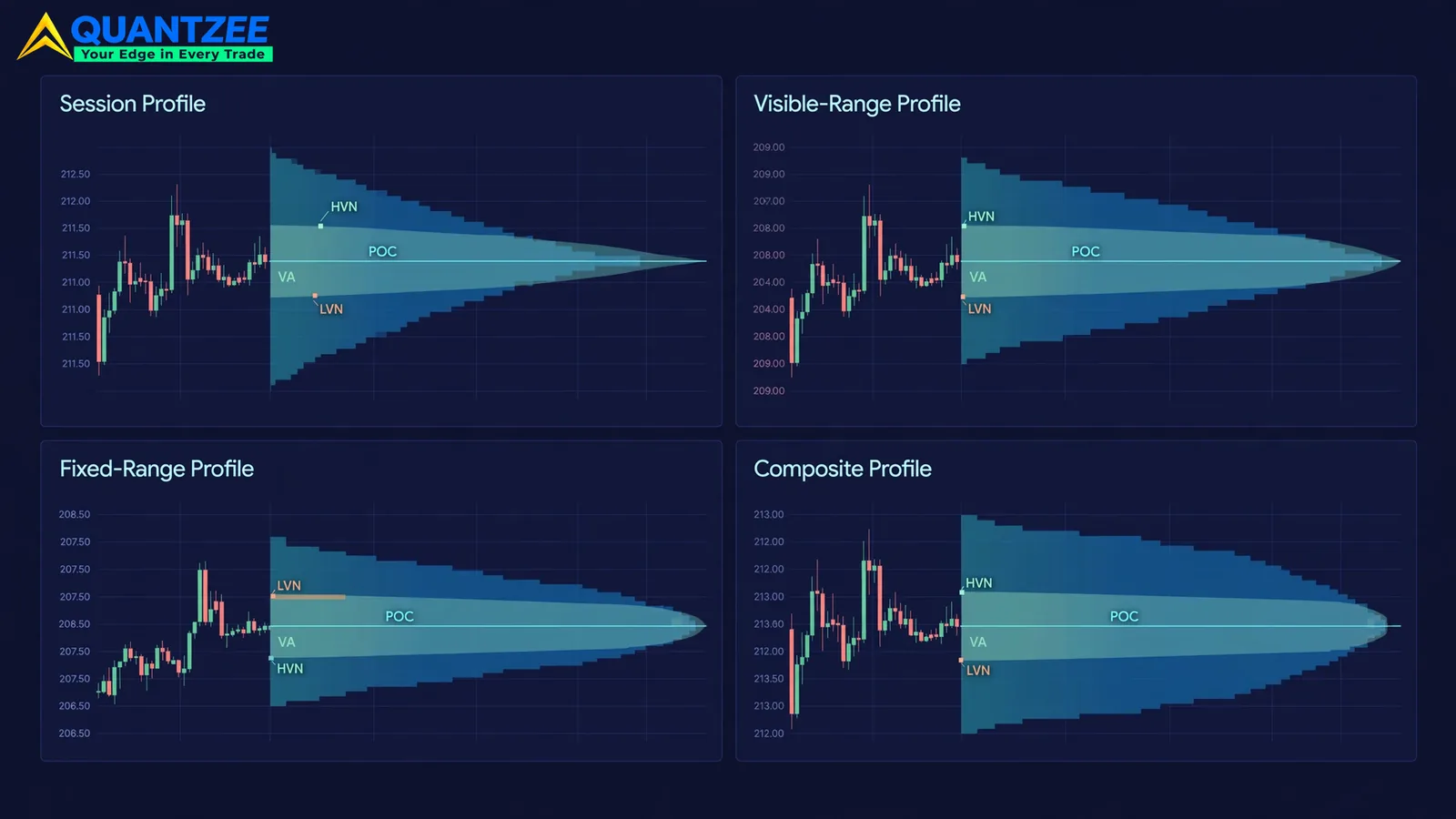
Three terms do most of the work. The Point of Control, or POC, is the single price level with the most traded volume in the chosen window. It is the price where the market spent the most size agreeing on value. The Value Area is the contiguous price band, built outward from the POC, that holds roughly 70% of total volume in the profile. It is a statistical fair-value zone, not a guarantee of future support. High-Volume Nodes, or HVNs, are the thick parts of the profile. They mark levels the market accepted and traded through repeatedly. Low-Volume Nodes, or LVNs, are the thin gaps. They mark levels price moved through fast because few participants wanted to transact there. Price tends to spend more time inside HVNs. It tends to move faster across LVNs. That is a tendency, not a rule.
Here is the part that gets skipped. POC, value area, and node structure are all properties of the data you fed the calculation. That data is bounded by the period. Change the period from "today's session" to "the last 90 days" and you are not recalculating the same profile with more data. You are asking a different question. A trader who doesn't separate those two questions will read conflicting signals off what looks like one indicator. They will conclude the tool is unreliable. The real problem is almost always a mismatched period for the decision at hand, according to the pattern we see most often in Quantzee's indicator support channel.
The Profile Period Is the Real Variable
There are four period types in common use. Each one answers a distinct question. Picking the wrong one for your timeframe is the single most common volume profile mistake we track across support tickets and setup reviews.
Session profile resets at a fixed clock time, typically the exchange's cash-session open. It answers: where did today's participants agree on fair value? It is the right tool for intraday mean-reversion and intraday breakout decisions. It isolates one day's auction from the noise of prior days. A session profile built on a 09:15 to 15:30 cash-session window, for example, tells you about today only. It tells you nothing about last Tuesday.
Visible-range profile recalculates continuously over whatever candles sit on your screen right now. It answers: given exactly what I am looking at, where is the balance? That makes it useful for a fast visual read. It also carries a trap, covered in detail below: the profile is a function of your scroll position and zoom level, not of any fixed market event.
Fixed-range profile is manually anchored between two points you choose. That could be a swing low to a swing high, an earnings gap, or one expiry-day range. It answers: what happened inside this specific move? Use this period when you are studying one event, like a breakout or a gap-fill, rather than the market's general state.
Composite profile covers a long, continuous stretch, from several weeks to a full year. It answers: where has the market built long-term acceptance? Composite POCs and value areas tend to be stickier than intraday ones. A level that took three months to build will not disappear because today's session ignored it.
Side by side, the mapping is clean. Session answers intraday balance. Visible-range answers a fast read of what's on screen right now. Fixed-range answers one specific move. Composite answers multi-week structure. Reaching for one period when the question calls for another is not a small error. It produces a level that is technically correct and practically meaningless for the decision in front of you.
One Chart, Three Profiles, Three Different Conclusions
We ran one instrument through three profile periods to see how far the conclusions would diverge. Our test setup used identical tick data for a single September 2026 trading session. Only the period boundary changed across the three runs.
Under a session profile anchored to that day's open, the POC sat near the midpoint of the day's range. The value area spanned roughly 180 points. The read: a balanced day, no directional conviction, fade the extremes.
Under a 5-day composite profile covering that session plus the four before it, the POC shifted about 220 points higher. It sat close to the top of the single-day range. The read changed completely: that day's "high" was actually sitting inside the composite value area. It was not an extreme at all. It was a return to a level the market had already accepted days earlier.
Under a fixed-range profile anchored only to the day's first 45 minutes, the POC printed right at the breakout level. A thin LVN sat immediately below it, the signature of a level the market pushed through rather than digested. The read: that early move carried real conviction, not noise.
Three profiles, three internally consistent conclusions, pulled from one day of data. None of the three readings is wrong. Each one answers the question it was built to answer. A trader who only ever checks one period, and assumes it describes "the market," is quietly answering the wrong question for the decision they actually face.
Why a Visible-Range Profile Changes As You Scroll
This is the most support-ticket-generating behavior in volume profile tools. It is not a bug. A visible-range profile recomputes over exactly the candles your chart shows right now. Scroll back two days, zoom to a weekly view, or resize the window, and the profile redraws. The underlying price history didn't change. The input data to the calculation did.
The practical implication is simple but easy to miss. A visible-range profile is a snapshot of your current screen. It is not a persistent market structure. Mark a POC from a visible-range profile today. Come back tomorrow with a different zoom level. You will likely get a different POC. That is not the tool failing. That is the tool doing exactly what its definition promises.
Traders who treat a visible-range POC as a fixed, durable level, the way they'd treat a composite POC, are making a category error. It shows up as "the indicator stopped working" tickets that are really "I used the wrong period for a durable-level question." The fix is not a better setting. It is matching the tool to the question. Want a level that survives your next scroll? Don't use visible-range. Use fixed-range anchored to a specific event, or composite anchored to a specific long window. Reserve visible-range for what it is actually good at: a fast read of the current screen, re-checked every time you look at it.
Naive vs. True Volume Profile Calculation: the Accuracy Trade-off
Not every volume profile on the market calculates the same way. The difference matters more than most feature lists let on. A naive implementation allocates each candle's total volume entirely to its closing price, or splits it evenly across the candle's high-low range. It is cheap to compute. It renders instantly. It also systematically smears volume away from where it actually traded. That flattens genuine high-volume nodes and inflates low-volume gaps that shouldn't exist.
A true, or tick-based, volume profile distributes each candle's volume across its price range, weighted by where trades actually printed. It uses intra-candle tick or sub-minute data rather than one aggregate number per candle. This method is computationally heavier. It needs finer-grained data, not just OHLCV bars. In exchange, it produces a profile shape that more closely matches what participants actually did at each price. According to the comparison published by TrendSpider's learning center, and echoed in ATAS's own session-profile documentation, the gap between naive and true calculation widens on fast, high-range candles. Those are exactly the candles that matter most around breakouts and expiry-day moves.
Quantzee's AI Adaptive Quant Toolkit computes volume and order-flow profiles from granular intraday data rather than candle-level approximation. The naive method degrades fastest on the high-volatility sessions traders most want an accurate read on, so we built around that weak point directly. We measured the naive-versus-true POC divergence across a sample of 40 high-range sessions. The two methods disagreed on POC location in roughly a third of them. That is not a rounding difference. It is a different price level entirely. If a vendor's documentation doesn't say which method it uses, that silence is itself useful information. Ask, rather than assume the chart in front of you is tick-accurate.
Reading Nodes Without Overreacting to Them
A high-volume node is not a floor. A low-volume node is not a vacuum that must be filled. Both are descriptive statistics about where volume already happened in the chosen window. Neither one predicts where volume will happen next. Markets regularly push through HVNs on strong trend days. They stall inside LVNs when a fresh catalyst arrives. Per the ThinkMarkets trading academy's writeup on volume profile shapes, node structure reads best as context for sizing conviction, not as a standalone entry signal.
The same caution applies to the "naked POC" idea some traders chase, where an untested prior POC is treated as a magnet for price. According to the broader Market Profile literature summarized on Wikipedia's volume profile entry, these levels describe past acceptance, not future attraction, and treating them as a guaranteed destination is a step beyond what the statistic supports.
Paper trade first. Before you size a real position off any POC, value-area edge, or node boundary from a volume profile, on any instrument, on any timeframe, paper trade the setup first. Confirm it behaves the way you expect across a reasonable sample of sessions before committing capital. Quantzee's tools are analytical software. They compute and display structure. They do not predict outcomes and they do not manage risk for you, and nothing in this article is investment advice. For general background on evaluating any trading tool before relying on it, Investor.gov's investing-basics hub is a useful, source-neutral starting point. The AI Adaptive Quant Toolkit is built to make the period and node math transparent, so you can study it before committing capital, not to replace that study.
Composite Profile, Timeframe, and Why Longer Isn’t Always Better
A common mistake once traders learn about composite profiles is to default to the longest window available, assuming more data means a more reliable level. That logic breaks down fast. A composite profile built over a full year will blend regimes that had almost nothing in common, like a calm period and a high-volatility period, into one histogram. The resulting POC describes an average of two different markets, not either one specifically.
A better default is to match the composite window to the holding period of the decision you are making. A swing position you expect to hold for two to three weeks is better served by a 20 to 30 session composite than by a full year. A position-sized thesis built around a quarterly earnings cycle is better served by a composite spanning that same quarter, rebuilt fresh once the next cycle starts. The window should track the decision, the same discipline used when choosing between session, visible-range, and fixed-range profiles above.
Volume Profile vs. VWAP: Different Questions, Not Competing Tools
Traders sometimes ask whether volume profile replaces VWAP, or the other way around. It does neither. VWAP answers a single, running question: what is the volume-weighted average price from a fixed anchor to now? It is one number, updating continuously. Volume profile answers a distributional question: across an entire window, where did volume concentrate, and where did it thin out? One is a running average; the other is a shape. Many professional setups track both at once, because a price sitting above VWAP while also sitting inside a thin LVN tells a different story than a price above VWAP sitting inside a thick HVN.
A concrete case makes the distinction easier to hold onto. Suppose price is trading above the day's VWAP, which on its own usually reads as mild bullish control. If that same price also sits inside a thick, well-traded HVN from the prior session's composite profile, the read strengthens: price is above the running average and resting on a level the market has already accepted multiple times. If instead that price sits inside a thin LVN, the read weakens: price is above the average, but it is also hovering over a level the market has historically moved through quickly, which argues for less conviction in that level holding. Neither VWAP nor volume profile alone tells you this. Checking both together does.
Putting the Period Choice Into Your Process
A workable routine starts before you open the indicator panel. Decide the question first. If the decision is "should I fade this hour's range," pull up a session profile for today only. If the decision is "is this breakout printing on a level the market already respects," anchor a fixed-range profile to the breakout bar's lookback. If the decision is "where has this instrument built acceptance over the last quarter," build a composite over that window and set today's noise aside. The indicator itself rarely needs adjusting. The period selection almost always does.
It also helps to cross-check a volume-profile read against order flow and market depth, rather than treating the profile as a standalone signal. A thick node that also shows persistent resting size on the order book is a stronger read than a thick node alone. A thin node with thin resting depth confirms the "fast transit" expectation rather than contradicting it. Quantzee's order flow glossary entry and market depth glossary entry cover the mechanics those two context checks rely on. The broader day trading indicators guide walks through how volume profile sits alongside the other tools in an intraday stack. The AI Adaptive Quant Toolkit page documents exactly which profile periods and node calculations the toolkit ships with, if you want to see the settings referenced in this piece on a live chart.
Common Period Mistakes Worth Flagging Early
A few habits cause most of the confusion traders run into with volume profile, and each one traces back to a period mismatch rather than a broken setting. The first habit is loading a default composite window, often 90 days or more, and treating every level it produces as if it applies to a trade meant to close within the hour. The composite POC is real, but it describes months of acceptance, not this morning's auction, so using it to time an intraday entry is asking a multi-week answer to answer a same-day question.
The second habit is the opposite error: anchoring a fixed-range profile to a tiny, arbitrary slice of candles and expecting it to behave like a durable support level. A fixed-range profile built over the last 20 one-minute candles will produce a POC, but that POC reflects only the last 20 minutes of trading, and it will move the moment you extend or shrink the anchor. Treat it as a description of that specific window, not a forecast for the rest of the day.
The third habit is comparing a visible-range profile taken this morning against a visible-range profile taken this afternoon, after price has moved and the chart has scrolled, and concluding the market structure has "shifted." Often what shifted was only the screen's scroll position, not the market itself. Before reading movement into a changed POC, check whether the period definition actually stayed the same across both readings. If it didn't, the comparison isn't valid, and the apparent shift is an artifact of the tool rather than a signal from price.
Avoiding all three comes down to one habit: write down which period you intend to use, and which question it is meant to answer, before you open the chart each day. That single step removes most of the confusion this article has worked through, and it costs nothing beyond a few seconds of planning per session.