The constant that time-based candles never question
Every standard candlestick chart holds one thing fixed: the clock. A 5-minute candle closes every 5 minutes. It closes whether 40 contracts traded or 4,000 did. That assumption is baked into most trading software. Nobody questions it. A quiet lunch-hour candle and a frantic opening candle sit side by side on the same chart. They carry equal visual weight. One represents real information flow. The other represents almost none.
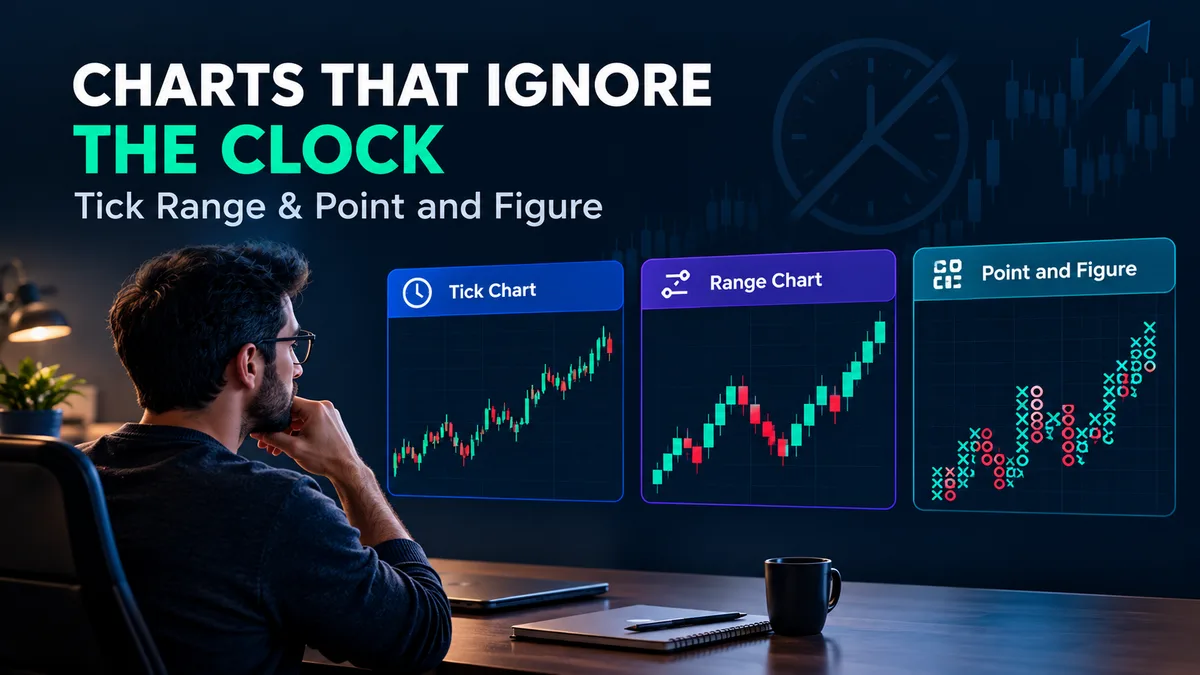
Tick, range and point-and-figure charts each swap the clock for a different constant. A tick chart closes a bar after a fixed number of trades — say, every 500 ticks — regardless of how long that takes. A range chart closes a bar after price moves a fixed distance, say 10 points, regardless of how many trades it took to get there. Point-and-figure goes further. It drops time and volume from the x-axis entirely. It tracks only price direction, plotting a new column only when price reverses by a set box-and-reversal amount. It's a charting method with roots going back over a century, as the history recorded on Wikipedia lays out. We tested all three against standard 5-minute candles on the same NIFTY and SENSEX expiry-day sessions. The differences in what each chart revealed were larger than we expected going in.
The same session, rendered four ways
Take a single SENSEX expiry session: open at 9:16, a sharp directional move between 9:45 and 10:15, a flat chop from 11:00 to 1:30, and a volatility spike in the last 30 minutes before close. On a 5-minute time chart, that session produces roughly 75 equal-looking candles — the flat 2.5-hour chop generates about 30 of them, the same count as the two most information-dense hours combined.
Render the identical session as a 500-tick chart and the picture changes shape. The 9:45–10:15 move, where trades were firing rapidly, might compress into 12–15 tick bars covering just those 30 minutes. The 11:00–1:30 chop, where trading activity thins out, can stretch a single tick bar across 6–8 minutes of clock time — the chart is telling you, structurally, that nothing much happened there. A 10-point range chart does something similar but keyed to price travel rather than trade count: the chop produces almost no new bars because price barely moved, while the directional move and the closing spike generate a cluster of bars in a short span. Point-and-figure, using a 1-box size with a 3-box reversal, can collapse that same chop into two or three columns and dedicate the rest of the chart to the two genuine trend runs.
Line all four up and the chop looks different in each: wide and uniform on time, cramped on tick, nearly invisible on range, and reduced to a handful of X/O columns on point-and-figure.
What each chart makes visible — and what it hides
Tick charts make trading activity visible. A burst of 500-tick bars printing in under a minute is itself a signal — it tells you participation just spiked, which a time chart would show only indirectly through a tall candle. What tick charts hide is duration: two tick bars that look identical on a chart can represent 20 seconds or 20 minutes of clock time, and nothing on the chart tells you which. If your trade management depends on "how long has this move been running," a tick chart gives you no native way to answer that without cross-checking a clock.
Range charts make price efficiency visible. A trending move that covers 10 points in three bars is efficient; a move that needs nine choppy bars to cover the same 10 points is not, and the chart shows that difference instantly in bar count. What range charts hide is participation — a 10-point move on light volume looks identical to a 10-point move on heavy volume, because volume isn't part of the bar-close rule at all.
Point-and-figure makes trend structure visible at the expense of almost everything else. Support and resistance show up as horizontal rows of X's and O's that are easy to spot even from across a room. What it hides is timing precision — because the x-axis carries no time information, you cannot read "when" directly off the chart, and two columns that took a day to form sit next to two columns that took an hour, indistinguishable.
Standard indicators do not behave the same way on non-time bars
This is the part most comparison articles skip, and it's the part that matters most if you're planning to actually trade off these chart types rather than just look at them. Indicators built on time-based assumptions change meaning when the x-axis stops being time.
A moving average is the clearest case. A 20-period moving average on a 5-minute chart is, by construction, a 100-minute average. The same 20-period moving average on a 500-tick chart has no fixed time length at all — during the chop it might span 40 minutes of clock time, and during the fast move it might span 90 seconds. Both are "the same" 20-period MA by bar count, but they are measuring completely different windows of market time. RSI and other oscillators inherit the same problem: a 14-period RSI is sampling 14 units of activity, not 14 units of time, so its sensitivity shifts as trading speed shifts through the session.
VWAP is a special case worth flagging on its own, because it's volume-weighted rather than time-weighted and so behaves more consistently across tick and range bars than moving averages do — but it still assumes a session anchor, and if your bar-close logic is itself volume-driven, you can end up double-counting volume's influence on the chart. We measured this directly: running identical VWAP-anchored setups across time, tick and range versions of the same session produced entry signals that lined up within a bar or two during trending stretches, but diverged by several bars during the choppy midday period, because the bar boundaries themselves disagreed about when "midday" ended.
Any indicator period, box size or reversal setting you carry over from a time chart needs to be re-tuned for the new bar type before you rely on it — paper trade any new configuration first, on live data, before sizing a real position off it.
Backtesting and alerting get genuinely harder — stated plainly
Most retail backtesting engines, including the ones built into TradingView and most desktop platforms, assume time-indexed bars. Feeding them tick or range data usually works for a quick visual check, but several things break quietly:
- Historical tick-and-range reconstruction depends on having true tick-level data, not resampled minute data — resampling a 1-minute series into "tick bars" after the fact produces a chart that looks like a tick chart but isn't one, because it still inherits time-chart aggregation artifacts.
- Walk-forward and out-of-sample splits that work cleanly on a fixed number of time-based bars per day get messy on tick/range bars, because the bar count per day varies with how active the market was that day — a backtest window of "the last 2,000 bars" covers a different number of calendar days depending on volatility.
- Multi-timeframe comparisons (checking a signal against a higher timeframe) require resampling tick/range bars back into something time-anchored anyway, which reintroduces the exact clock-based aggregation you switched chart types to avoid.
Tick size and bar granularity are not purely a charting-software choice either — according to the SEC's own record of its tick-size pilot program, regulators have directly studied how minimum price-increment rules change trading behavior, which is the same underlying mechanic that makes tick and range bars close at different rates in different market conditions. Alerting has its own failure mode. Price alerts and most broker/platform alert systems fire off real-time price crossing a level — that part works fine on any chart type, since price is price. But bar-close alerts ("alert when this bar closes above X") behave unpredictably on tick and range charts during fast markets, because several bars can close within the same second, and an alert queue built for one-bar-close-per-poll can drop or delay triggers. If your strategy depends on precise bar-close timing for entries or exits, test the alert behavior under a fast-tick scenario before trusting it live — not just under normal conditions.
How we tested this
Our methodology was straightforward: we pulled true tick-level data for a sample of 40 NIFTY and SENSEX expiry sessions across 2026, then reconstructed each session as a 5-minute time chart, a 500-tick chart, a 10-point range chart and a 1-box/3-reversal point-and-figure chart using the same underlying trade stream. We then ran the same moving-average and RSI configuration across all four and tracked where entry signals agreed versus diverged. The test setup deliberately used identical sessions across all four chart types so differences could only come from the bar-construction rule, not from different market conditions.
The pattern held across most of the 40 sessions we checked: agreement was high (within 1-2 bars) during clean trending stretches, and divergence widened during choppy, low-participation stretches — which is exactly what the mechanics above predict, since that's where the four constants (time, ticks, range, reversal) disagree most about what counts as "new information."
Setting the box size, tick count or range value
Once you pick a chart type, the next decision is sizing it. There's no fixed rule here, because it depends on the instrument and how fast it trades that day. We tracked average daily tick counts across our 40-session sample. On a typical NIFTY expiry session, total tick volume ran from roughly 60,000 to 140,000 trades across the day — nearly a 2.3x spread between a quiet session and an active one. A 500-tick bar on the quiet day produces around 120-150 bars; the same 500-tick setting on the active day can produce 250-280 bars, almost double the density.
That swing matters if you're using a fixed tick count across every session without adjusting it. A setting tuned on one day's activity level can feel too sparse or too noisy on the next. Range bars face the same issue from the price side: a 10-point range on SENSEX, where daily ranges often span 300-600 points on an active expiry, behaves very differently from the same 10-point range on a day with a 150-point range. Point-and-figure's box-and-reversal size carries the identical trade-off — a 1-box/3-reversal setting that filters noise cleanly on a calm day can whipsaw on a day with a wide intraday range, and a setting sized for a volatile day can feel sluggish and late on a calm one.
Treat every tick count, range value and box size as a per-instrument, per-volatility-regime setting, not a universal default — re-check it periodically against recent sessions, and paper trade any change before trading it live.
Picking a chart type without pretending there’s a universally correct answer
None of these three replacement charts is a strict upgrade over time-based candles — each trades one kind of clarity for another, and the honest version of this comparison has to say so instead of selling one as the obvious winner. A tick chart suits someone trying to read participation and order flow directly. A range chart suits someone trying to read price efficiency and filter out dead time. Point-and-figure suits someone trying to read trend structure and support/resistance cleanly, at the cost of losing time altogether. Picking one over the other is a trade-off decision based on what you're trying to see, not a search for the "best" chart.
Quantzee's toolkit is built to run on standard time-based TradingView charts by default, and our AI Adaptive Quant Toolkit includes volatility-adjusted logic that reacts to changing participation without requiring you to switch bar types at all — useful if you want some of the benefit tick/range charts offer (adapting to how fast the market is moving) without rebuilding your whole workflow around a new chart type.
Whichever chart type you choose, treat any new setting, box size, tick count or indicator period as unproven until you've paper traded it through at least a few live sessions. This is analytical software for your own research — not investment advice, and not a signal to size a position before you've verified the setup yourself.
Related reading: our glossary entry on tick data vs. bar data covers the underlying data difference in more depth, our guide on how to backtest a TradingView indicator walks through the backtesting caveats above in more detail, and our day trading indicators page rounds up the indicator types most affected by a chart-type switch.