
VWAP Pro+
5 Anchor Modes + σ Bands + Reversion.
Every VWAP style in one indicator — anchored, banded, non-repainting.
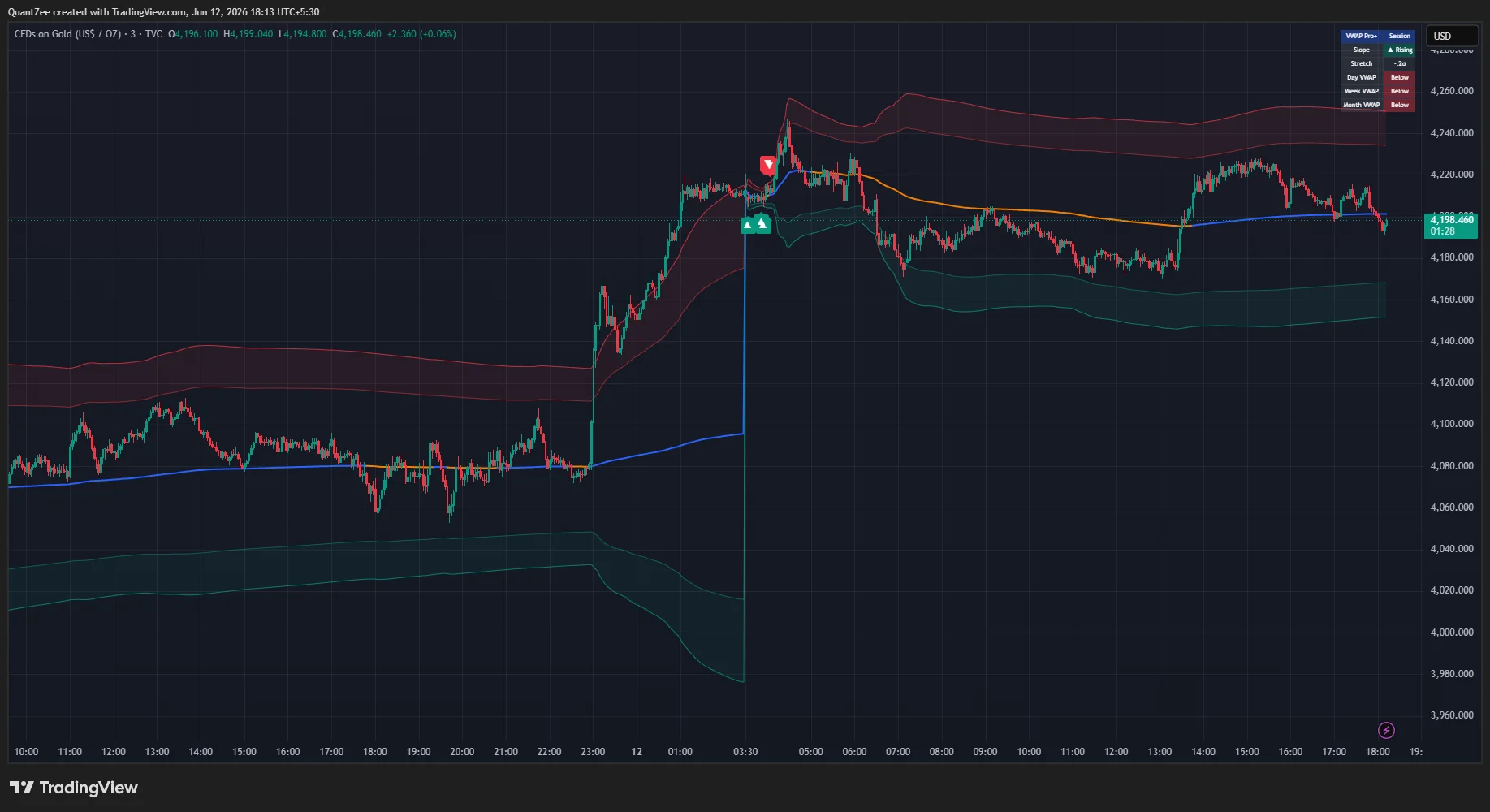
VWAP Pro+ is a complete VWAP toolkit: five anchoring modes including click-to-anchor Custom and automatic swing anchoring, anchored standard-deviation bands, a band-rejection reversion signal engine with a trend filter, a slope-and-stretch info panel, and a Day/Week/Month VWAP position table — all in one indicator.
The VWAP calculation is the standard formula; Pro+ layers on five anchor modes, variance-since-anchor σ bands, rejection signals with a trend filter, and a multi-horizon bias table — so you read trend, stretch, and context at a glance.
14-day money-back guarantee · Invite-only access granted on subscription
The Core Concept
One Anchor, Every Style — VWAP That Goes Wherever Price Matters
Standard VWAP resets with the session and stops there. VWAP Pro+ lets you anchor it where it actually matters — to the week, the month, a custom swing or news bar, or automatically to the most extreme swing high or low in a lookback. Around that anchor it builds ±1σ/±2σ/±3σ bands from the variance of every traded price since the anchor, the statistically consistent way to measure stretch.
On top sits a band-rejection reversion engine and a Day/Week/Month position table, turning a single average into a complete trend-and-stretch system.
New to the concept? Read our glossary explainer on VWAP and anchored averages. For the underlying theory, see Investopedia on the Volume-Weighted Average Price (VWAP) and TradingView's docs on the built-in VWAP indicator.
5
Anchor Modes
Session, Week, Month, Custom (any event bar) and Auto swing re-anchoring — every VWAP style in one indicator.
±3σ
Anchored Bands
Variance-since-anchor bands — the statistically correct way to measure how stretched price is from VWAP.
No
Repainting
Anchored VWAPs accumulate forward and never recalculate history; signals use completed-bar conditions.
Key Features
Everything VWAP Should Be
Five anchor modes, anchored σ bands, a rejection-reversion engine, a slope/stretch panel and a multi-horizon position table — fused into one indicator.
Five Anchor Modes in One Engine
Session, Week and Month anchors for conventional use; a Custom mode where you set any date/time to anchor VWAP from a specific swing, gap, or event bar; and an Auto mode that continuously re-anchors VWAP to the most extreme swing high or swing low inside a configurable lookback. Auto mode is computed in constant time using cumulative price-volume sums rather than per-bar loops, so it stays fast even with large lookbacks.
Anchored Standard-Deviation Bands
±1σ, ±2σ and ±3σ bands are derived from the variance of traded prices since the anchor — not a rolling window — which is the statistically consistent way to band an anchored VWAP. Each band toggles independently (±2σ and ±3σ shown by default, ±1σ off), so you show only the stretch levels you actually trade.
Band-Rejection Reversion Engine
A signal prints when a bar pierces a chosen band (1σ/2σ/3σ) and closes back inside it — a rejection, not a mere touch. An optional trend filter restricts bullish rejections to rising-VWAP conditions and bearish rejections to falling-VWAP conditions. In practice, the ±2σ rejection with the trend filter ON represents the highest-probability setup: price reaches a statistically overextended zone, gets rejected back inside, and then reverts toward VWAP with the broader institutional flow supporting the reversion rather than fighting it.
Slope & Stretch Panel
A compact panel shows the VWAP slope direction and the current distance of price from VWAP measured in σ units, with a highlight when price is stretched beyond 2σ — an instant read on whether the market is extended. The VWAP line itself is colored by slope, so trend state is visible without the panel.
Day / Week / Month Position Table
Independent of your chosen anchor mode, the panel always tracks whether price is above or below the Daily, Weekly, and Monthly VWAPs, computed natively on the chart timeframe — a one-glance multi-horizon bias check.
Non-Repainting by Design
Session/Week/Month/Custom VWAPs accumulate forward from their anchor and never recalculate history. Signals are based on completed-bar conditions; for alerts, "Once per bar close" is the recommended trigger. Auto mode re-anchors when a new extreme forms — by-design, disclosed for transparency.
How To Use It
Reading the Signals
- Trend days. Price holding above a rising VWAP with shallow pullbacks to the ±1σ region is classic trend behavior; the position table confirming "Above" on Day and Week adds conviction.
- Reversion trades. Rejections at ±2σ/±3σ with the trend filter ON give pullback entries in the direction of the VWAP slope; with the filter OFF you get pure fade signals — more signals, more risk, choose deliberately.
- Anchored analysis. Switch to Custom mode and set the anchor at a major swing low, breakout bar, or news event — the VWAP then represents the average position of every participant since that event, and the bands show how stretched price is relative to them.
- Read trend without the panel. The VWAP line is colored by slope — one color rising, another falling — so trend state is visible at a glance.
What You Can Achieve
From One Line to Full Context
Trade Trend Days Cleanly
Price holding above a rising VWAP with shallow pullbacks to the ±1σ region is classic trend behavior — and the position table confirming "Above" on Day and Week adds conviction.
Time Reversion Entries
Rejections at ±2σ/±3σ with the trend filter ON give pullback entries in the direction of the VWAP slope; filter OFF gives pure fade signals — more signals, more risk, your choice.
Anchor to What Matters
Switch to Custom mode and anchor at a major swing low, breakout bar, or news event — the VWAP then represents the average position of every participant since that event.
Measure Stretch Instantly
The slope-and-stretch panel reads distance from VWAP in σ units and highlights when price is beyond 2σ — you see extension before you commit.
Who It's For
Built for VWAP Traders
Whether you trade VWAP reclaims intraday or fade ±2σ stretches, VWAP Pro+ adapts to your chart — the anchor follows the event you care about and the σ bands recalibrate to every symbol and timeframe.
Intraday & VWAP Traders
Mean-Reversion Traders
Institutional-Style Scalpers
Alerts
Six Alert Conditions
Bullish band rejection, bearish band rejection, price crossing above VWAP, price crossing below VWAP, close stretched beyond the upper band, and close stretched beyond the lower band. Route them to email, mobile push, or webhooks — and use "Once per bar close" for confirmed, non-repainting triggers.
FAQ
Common Questions
What is VWAP Pro+?
VWAP Pro+ is a complete VWAP toolkit in a single indicator: five anchoring modes (including click-to-anchor Custom and automatic swing anchoring), standard-deviation bands, a band-rejection reversion signal engine with a trend filter, a slope-and-stretch info panel, and a Day/Week/Month VWAP position table.
How is it different from the built-in VWAP?
The volume-weighted average price calculation itself is the standard formula. VWAP Pro+ adds five anchor modes in one engine (Session/Week/Month/Custom/Auto), anchored ±1σ/±2σ/±3σ standard-deviation bands derived from variance since the anchor, a band-rejection reversion engine with a trend filter, a slope-and-stretch panel, and a multi-horizon Day/Week/Month position table.
What are the five anchor modes?
Session, Week and Month for conventional use; Custom, where you set any date/time to anchor VWAP from a specific swing, gap, or event bar; and Auto, which continuously re-anchors VWAP to the most extreme swing high or swing low inside a configurable lookback (computed in constant time via cumulative price-volume sums).
What is the band-rejection reversion engine?
A signal prints when a bar pierces a chosen band (1σ/2σ/3σ) and closes back inside it — a rejection, not a mere touch. An optional trend filter restricts bullish rejections to rising-VWAP conditions and bearish rejections to falling-VWAP conditions, so you fade stretches back toward a developing trend.
Does it repaint?
Session/Week/Month/Custom VWAPs accumulate forward from their anchor and never recalculate history. Signals are based on completed-bar conditions — use "Once per bar close" for alerts. Auto mode re-anchors when a new extreme forms; this is the expected, by-design behavior of automatically anchored VWAP and is disclosed for transparency.
Which markets and timeframes does it work on?
All timeframes, and all symbols that have volume data — stocks, indices, futures, forex, and crypto. The script requires volume; on symbols without volume, VWAP cannot be computed.
Is it a complete trading system?
No. VWAP Pro+ is a technical analysis tool, not financial advice and not a complete trading system. Always apply your own risk management.
14-Day Money-Back Guarantee
Get Invite-Only Access to VWAP Pro+
One subscription unlocks all 13 Quantzee indicators, real-time alerts, and multi-market access.